I recently updated my mac to MacOS Tahoe and, after installing a brand-new Q-Chem 6.4, ran into problems with license check – at some point, Q-Chem stopped working, giving me license validation failure error.
The reason for that is that new MacOS is using rotating MAC address, that is, the MAC address changes when you connect to a new network, or changes at regular intervals. This is explained here
and also on the Apple site.
The solution to this problem is:
-
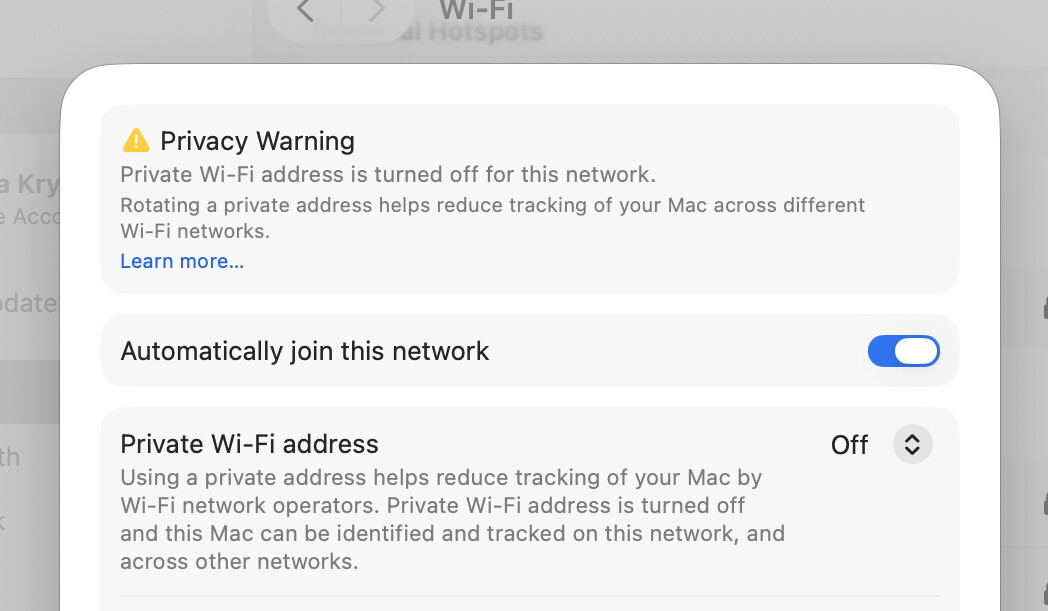
Before requesting the license, go to System Preferences->Network-WiFI and check ‘Details’. Then make sure ‘Private WiFI address’ is set to ‘off’, as shown here:
- Install the license – Q-Chem now should work on this network or when you are off-line.
- To make Q-Chem work while you are connected to other WiFi networks, you should manually set ‘Private WiFi address’ to ‘off’ for each network after you connect to it.
- If you do want to use Private WiFi address on some networks, then the solution is to run Q-Chem when you are off-line.